
HEX API Commands for VoiceTracker CD600
For the CD500, we developed the HTTP API, and this API also works on the CD600. See HTTP API.
For the CD600, we now also offer the HEX API (hexadecimal codes over IP).
This can be easier to use compared to the HTTP API, but it is less secure.
The HEX API runs on port 1270.
Table of Contents
- 1 Response codes
- 2 Camera
- 3 Devices
- 4 State
Response codes
| Response | Message | Description |
| ACKNOWLEDGE | 90 41 FF | Command has been received by the API |
| COMPLETION | 90 51 FF | Command has been completed with success |
| SYNTAX ERROR | 90 60 02 FF | Could not complete command due to a syntax error |
| NOT EXECUTABLE | 90 61 41 FF | Could not resolve command |
| COMPLETED WITH RETURN VALUE | 90 50 {value} FF | Command completed and returned {value} which is a set of bytes, specific to the endpoint, which contain the returned data |
Camera
| Endpoint | Description | Command | Returns |
| enable(camera_id) | Enables the given camera in order to use it for the control endpoints. Also sets up the single stream pipeline for this camera. | 81 01 01 01 XX XX FF XX XX is the numerical camera simple id | None |
| set_move_speed(speed) | Set the move speed for pan and tilt camera movements. | 81 01 01 02 XX FF XX is the speed 1-24 | None |
| move_down | Move the camera down. Won't stop until the `stop` endpoint is called. | 81 01 01 03 FF | None |
| move_left | Move the camera left. Won't stop until the `stop` endpoint is called. | 81 01 01 04 FF | None |
| move_right | Move the camera right. Won't stop until the `stop` endpoint is called. | 81 01 01 05 FF | None |
| move_up | Move the camera up. Won't stop until the `stop` endpoint is called. | 81 01 01 06 FF | None |
| zoom_in | Zoom the camera in. Won't stop until the `stop` endpoint is called. | 81 01 01 07 FF | None |
| zoom_out | Zoom the camera out. Won't stop until the `stop` endpoint is called. | 81 01 01 08 FF | None |
| focus_in | Focus the camera in. Won't stop until the `stop` endpoint is called. | 81 01 01 09 FF | None |
| focus_out | Focus the camera out. Won't stop until the `stop` endpoint is called. | 81 01 01 0A FF | None |
| home_camera | Move the camera to the home position. | 81 01 01 0B FF | None |
| move_stop | Stop the camera movement. | 81 01 01 0C FF | None |
Devices
| Endpoint | Description | Command | Returns |
| update_camera_configurations | Update the camera configurations in the camera state fetcher. | 81 01 02 01 FF | None |
| has_tracking_license(cam_id) | Checks if the camera has a tracking license | 81 01 02 02 XX XX FF XX XX is the numerical camera simple id | 90 50 {value} FF Value = 01 (True); or 00 (False) |
| enable_tracking(cam_id) | Activates tracking for the camera | 81 01 02 03 XX XX FF XX XX is the numerical camera simple id | None |
| disable_tracking(cam_id) | Deactivates tracking for the camera | 81 01 02 04 XX XX FF XX XX is the numerical camera simple id | None |
State
| Endpoint | Description | Command | Returns |
| get_active_camera | Get the active camera for the given simple ID. | 81 01 05 01 FF | 90 50 {value} FF Value = {XX XX} where XX XX is the numerical camera simple id |
| get_active_seat | Get the active seat for the given simple ID. | 81 01 05 02 FF | 90 50 {value} FF Value = {XX XX} where XX XX is the numerical seat simple id |
| turn_on | Turns on the system. LIVE mode | 81 01 05 03 FF | None |
| turn_off | Turns off the system. EDIT mode | 81 01 05 05 FF | None |
switch_to_scenario(scenario_id) | Switch to scenario by simple ID. | 81 01 05 06 XX XX FF XX XX is the numerical scenario simple id AA AA is auto-scenario DD DD is default-scenario | None |
| switch_to_preset(scenario_id) | Switch to preset by simple ID. | 81 01 05 07 XX XX FF | None |
| switch_to_camera(scenario_id) | Switch to camera by simple ID. | 81 01 05 08 XX XX FF | None |
In Edit Mode, under the Switcher tab, you can select various scenarios, cameras, and presets. When you hover over a button/icon, the corresponding HEX code will appear, which you can then use in your control system.
For example 81 01 05 08 00 13 FF, the simple ID for this camera is 00 13
In Hercules it looks like this:
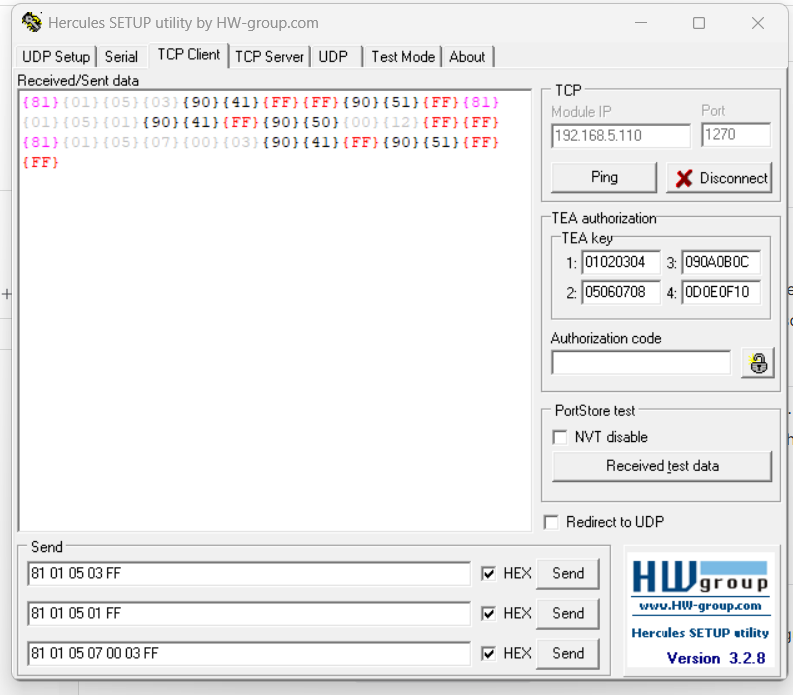
{81}{01}{05}{03} {90}{41}{FF}{FF} {90}{51}{FF} turns LIVE mode on.
{81}{01}{05}{01} {90}{41}{FF} {90}{50}{00}{12}{FF}{FF} which camera is active.
{81}{01}{05}{07}{00}{03} {90}{41}{FF} {90}{51}{FF}{FF} switch to preset 00 03.